
Python Tools for SEO
Technical SEO automation you can *trust* — CLI-first, no fluff.
A curated set of terminal-based Python utilities built to crawl, audit, map, and extract real data from your site — the way professionals actually work.
Not Sure Where to Start?
These tools solve different problems. Pick the one that matches what you’re actually trying to fix — not what a plugin told you was wrong.
Start Here: Meta Log
If you’re auditing pages, products, or large sites and want to see exactly what’s being output — titles, descriptions, canonicals, schema, and gaps — this is the foundation.
Most users start hereInternal Link Map
If rankings stall, pages feel orphaned, or your site has grown without structure, this exposes how pages actually connect — not how you think they do.
Schema Builder
If schema keeps failing validation, breaking on publish, or turning into JSON soup, this lets you extract, validate, and rebuild schema cleanly.
Quick SEO Meta Log
The meta audit tool for people who want answers, not scores
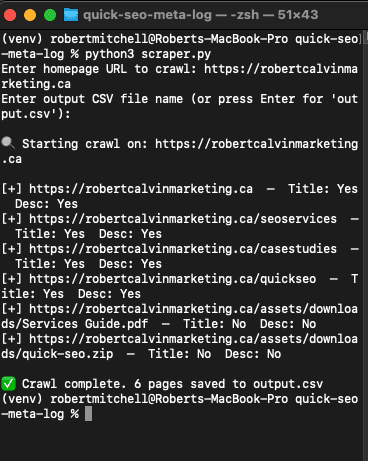
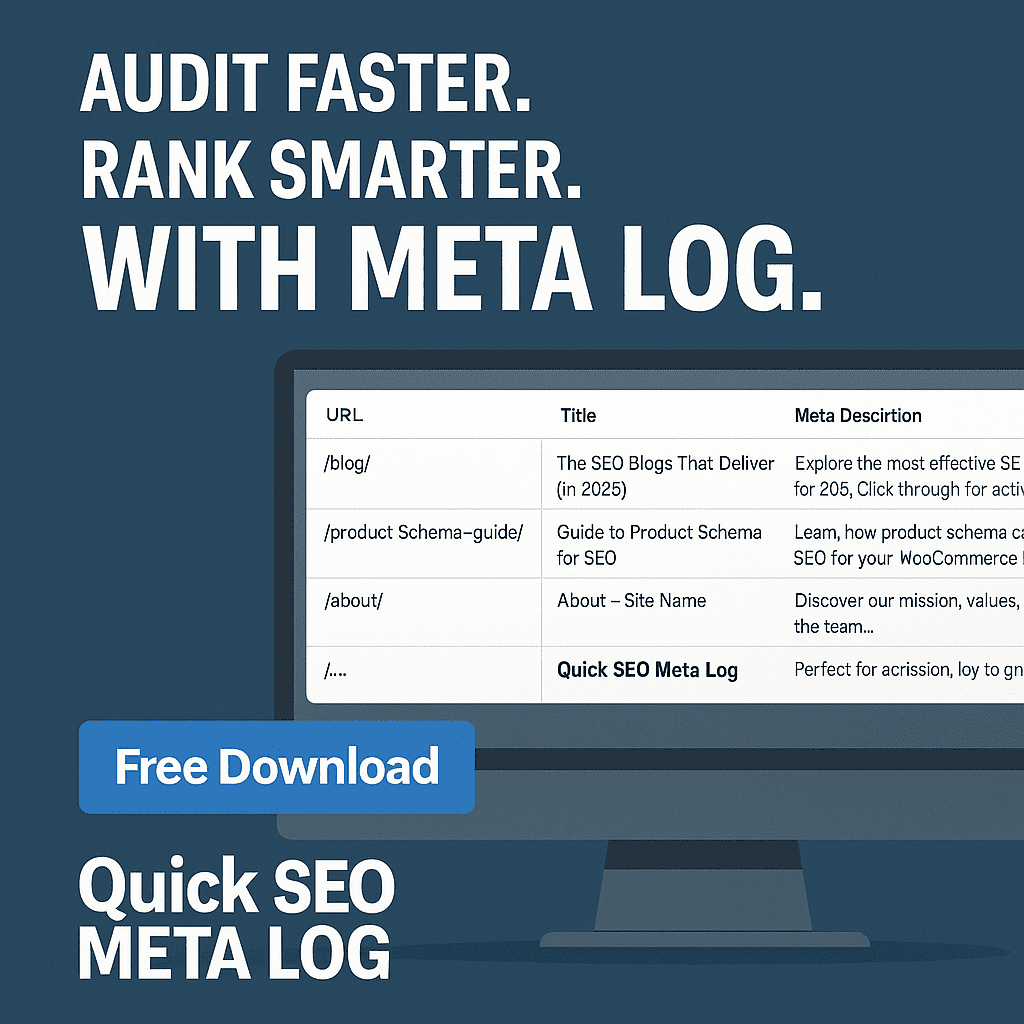
A lightweight Python CLI that crawls your site and shows you exactly what titles and meta descriptions are being output — no plugins, no dashboards, no guessing.
- Instant full-site crawl — no logins, no crawling limits, no UI overhead
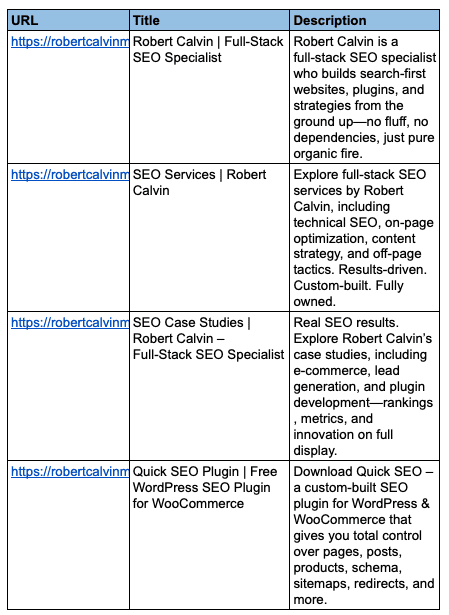
- Clean CSV export of every internal page’s title and meta description
- Immediate visibility into missing, duplicate, or weak metadata
- Runs locally — your data never leaves your machine
Why This Tool Exists
Most SEO tools bury the most important signals behind scores, colors, and suggestions. But the first thing users and Google see is still your title and description.
Quick SEO Meta Log strips everything else away and gives you the truth: what’s actually being rendered across your entire site — in a format you can act on.
What It Extracts
- Page URL
- <title> tag
- <meta name=”description”>
- Blank, duplicated, or missing values are preserved so problems are obvious
Common Use Cases
- Audit large sites for missing or duplicated metadata
- Prepare clean reports for clients or stakeholders
- Validate migrations, redesigns, or template rollouts
- Fix CTR-killing titles before touching content
Frequently Asked Questions
What does Quick SEO Meta Log actually do?
It crawls every internal link on your site and exports the title and meta description tags into a CSV so you can spot problems instantly.
Does it work on JavaScript-heavy websites?
Yes. A Selenium-powered scraper-js.py version is included for sites that require full JavaScript rendering.
Do I need to know Python?
No. Just run install.bat (Windows) or install.sh (Mac/Linux) and follow the prompts.
Where does the output go?
A clean CSV file in the same folder — ready for Excel, Google Sheets, Notion, or Looker Studio.
Is this safe for client sites?
Yes. It respects robots.txt by default and only requests publicly accessible pages.
How is this different from Screaming Frog?
Screaming Frog is powerful but heavy. Meta Log is focused, fast, and built specifically to answer one question: what metadata is actually on this site?
Search Intent Match
This tool exists to answer a single, high-intent question: “What meta data is actually on my site right now?”
- meta title and description audit tool
- export all meta data from website
- bulk meta description checker
- detect missing or duplicate titles
- Python SEO crawler for internal pages
These are real audit problems. Meta Log exists to solve them without noise.
Quick SEO Internal Link Map
The internal link audit tool for people who want the real structure
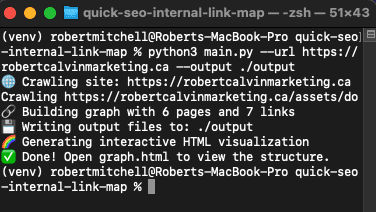
A Python CLI utility that crawls your entire site and exposes how pages actually connect — not how a plugin assumes they do.
- Full internal crawl — no browser, no UI, no crawling caps
- Multiple output formats for analysis and visualization
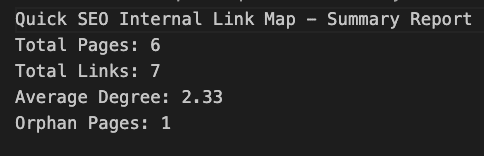
- Immediate orphan detection and link depth visibility
- Local-first execution — your site data stays yours
Why This Tool Exists
Internal links define crawl paths, topical authority, and indexation. But most SEO tools reduce them to counts and suggestions.
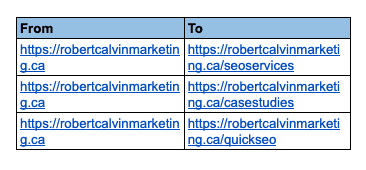
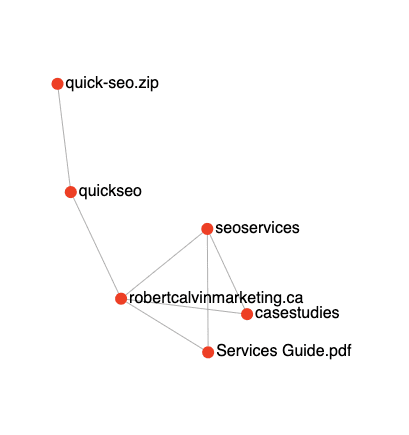
Quick SEO Internal Link Map shows the actual graph — every page, every link, and every relationship — exported in formats you can analyze, visualize, and explain.
What It Outputs
- links.csv — complete list of internal link relationships
- orphans.txt — pages with zero inbound links
- graph.dot — structural map for Graphviz
- graph.html — interactive D3-based visualization
Common Use Cases
- Visualize site structure during technical SEO audits
- Identify orphaned pages blocking indexation
- Validate silos, hubs, and content clusters
- Provide clear link structure reports to clients
Frequently Asked Questions
What does Quick SEO Internal Link Map actually do?
It crawls your site and records every internal link, then exports the full structure as CSV, DOT, and interactive HTML files.
Does it work with JavaScript-heavy websites?
No. This version parses static HTML only. JavaScript-rendered sites require a headless browser workflow.
Do I need to know Python?
No. Run install.bat or install.sh, then start the crawl with a single command.
Where does the output go?
All files are saved to the /output folder next to the script for easy access.
Is it safe to use on client websites?
Yes. It requests public URLs only and performs a controlled crawl. No data is stored or transmitted externally.
How is this different from Screaming Frog?
This is CLI-native, scriptable, and structure-focused. No GUI overhead, no Java, no abstraction.
Search Intent Match
This tool answers a core technical SEO question: “How do my pages actually connect?”
- internal link mapping tool
- detect orphan pages SEO
- python internal link crawler
- internal link visualization HTML
- sitewide link structure audit
These are high-intent audit queries. This tool exists to answer them cleanly.
Quick SEO Schema Builder
The structured data tool for people who don’t trust plugins
A Python CLI utility that extracts, validates, repairs, and builds schema using real rules — not guesses, presets, or AI hallucinations.
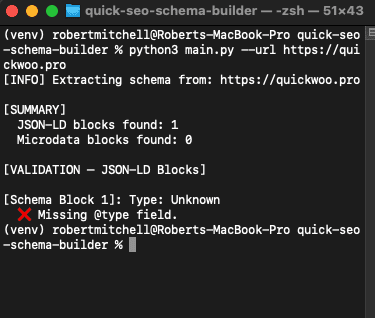
- Extract live schema — JSON-LD and Microdata from any URL
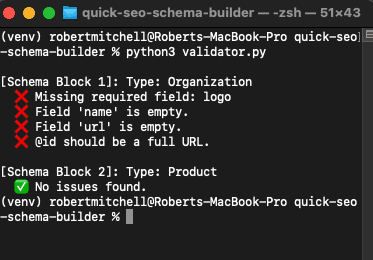
- Validate against real standards — Google + W3C rules
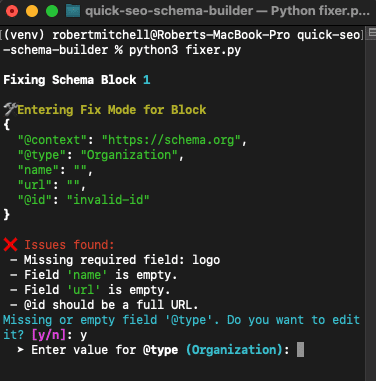
- Repair broken markup interactively, field by field
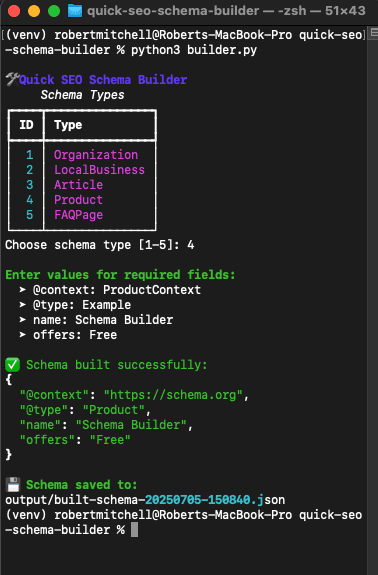
- Build schema from scratch when plugins don’t support your use case
- Local-first execution — no APIs, no SaaS, no data leakage
Why This Tool Exists
Most SEO plugins make schema “easy” by abstracting it. That’s also how they break it.
Quick SEO Schema Builder shows you exactly what’s on the page, what’s invalid, what’s missing, and lets you fix it deliberately. No magic. No automation pretending to understand your site.
This isn’t a wizard. It’s a scalpel for your structured data layer.
What It Outputs
- extracted-schema.json — raw schema blocks pulled from live pages
- fixed-schema-*.json — repaired schema with missing fields resolved
- built-schema-*.json — clean JSON-LD templates generated from scratch
Common Use Cases
- Audit client pages for invalid or incomplete schema
- Build schema types plugins don’t support properly
- Fix broken
@id, missing required fields, or duplicate entities - Export JSON-LD for direct injection or developer handoff
Frequently Asked Questions
What does Quick SEO Schema Builder actually do?
It extracts schema from live pages, validates it against real rules, lets you repair broken fields interactively, or build new schema from scratch — then saves everything as clean JSON.
Does it handle JavaScript-rendered schema?
No. This CLI version parses static HTML only. JavaScript-rendered schema requires a headless browser workflow.
Can I build schema from scratch?
Yes. Builder mode lets you select schema types like Product, Article, FAQPage, LocalBusiness, and manually define every field.
What if the schema is incomplete or invalid?
The fixer walks you through each issue interactively and outputs a repaired JSON-LD file that passes validation.
Do I need to know Python?
No. Run install.bat or install.sh and follow the prompts.
Why use this instead of Yoast, RankMath, or SEOPress?
Because plugins abstract schema and hide mistakes. This tool exposes everything and gives you full control.
Search Intent Match
This tool answers a high-intent technical SEO question: “Is my structured data actually valid?”
- validate schema markup CLI tool
- extract json-ld from website
- schema markup audit tool
- build FAQPage schema manually
- fix invalid schema fields
These queries reflect real-world schema pain points. This tool exists to solve them cleanly.

What Is Schema Markup—and Why Your SEO Depends on It
Schema markup isn’t optional in 2025—it’s the backbone of how search engines interpret and display your content. Without structured data, your pages are just HTML soup. With it, they become eligible for enhanced search features like FAQs, reviews, product info, authorship, and more. That’s not hype—it’s structured dominance. Google doesn’t rank what it doesn’t understand, and schema is how you give it a crystal-clear blueprint.
📦 The Most Valuable Schema Types for SEO in 2025
- ✅ Article + WebPage – Define blog post content, publication date, author, and visibility
- ✅ Product – Display prices, reviews, and availability directly in search results
- ✅ LocalBusiness – Show hours, address, phone number, and accepted payments
- ✅ FAQPage – Inject question-answer blocks that show up under your main listing
- ✅ Organization / Person – Verify identity and add trust signals to your brand
- ✅ BreadcrumbList – Improve internal navigation and SERP breadcrumbs
- ✅ SoftwareApplication – Perfect for SaaS, plugins, and download pages
Even small content sites benefit from schema like SiteNavigationElement or SitelinksSearchBox. The trick? You need to match schema types to your actual content, not what you wish it was.
🧠 How to Add Schema the Right Way
Always use JSON-LD, embedded directly in the <head> or injected server-side. Avoid Microdata—it’s bloated and fragile. Google prefers clean, structured, and clearly separated metadata. If you’re editing schema manually, every mistake costs you eligibility. If you’re using a plugin, assume it’s doing it wrong unless you inspect the raw output.
🚨 Common Schema Mistakes That Kill Rankings
- ❌ Marking up content that doesn’t appear on the page (spam trigger)
- ❌ Using the wrong @type for your content (Google ignores it)
- ❌ Leaving required fields blank (no rich result eligibility)
- ❌ Relying on JS-rendered schema that bots never see in time
✅ Quick SEO Schema Builder Solves All of This
The Quick SEO Schema Builder is a CLI-based power tool that extracts real schema from any page, validates it against Google’s requirements, lets you fix it field-by-field, or build it from scratch using structured templates. No GUIs. No plugin lock-in. Just clean, exportable JSON-LD under your full control.
Use Case: Auditing a client site? Drop their URL into the Schema Builder, see exactly what schema they’re using, and instantly identify what’s broken, missing, or spammy. Then fix it and deliver it back clean.
🧪 Test Before You Inject
After building or fixing schema, always validate with Google’s Rich Results Test or the Schema Markup Validator. If you built it with Quick SEO Schema Builder, odds are you’ll pass the first time.
Takeaway: Schema markup is the fastest route to rich results, better SERP visibility, and deeper topical authority. But only if you do it right—and most people aren’t. Quick SEO Schema Builder gives you the tools to win the structured data game without guessing, hoping, or plugin chaos.
Why Metadata Still Matters in 2025
Meta titles and descriptions aren’t dead—they’re the handshake before the click. In 2025, Google’s CTR-based ranking systems mean those 160 characters are more than a formality—they’re performance drivers. Quick SEO Meta Log gives you visibility into every title and description across your site, so you can control the pitch before Google rewrites it.
🎯 Write Titles That Command Attention
- ✅ Keep titles between 50–60 characters
- ✅ Lead with a keyword, follow with a benefit or emotion
- ✅ Use pipes (|), brackets [ ], and dates for structure and urgency
- ✅ Avoid duplication—every page deserves its own hook
Example: “Best SEO Tools for WooCommerce [2025 Review]” or “Fix Duplicate Meta Tags | Quick SEO Guide.”
Meta Log surfaces duplicates instantly so you can fix them before your rankings drop—or before Google rewrites them worse than you would.
🧠 Meta Descriptions That Convert
You’ve got one shot to convince the user. Start with what the page is. Add a benefit. Use verbs like Discover, Compare, Analyze, Fix. Include the keyword up front—but don’t jam it in unnaturally. Then finish with a light CTA.
Example: “Crawl every page of your site and export missing or duplicate metadata to CSV. Optimize faster, rank smarter.”
📊 Why Quick SEO Meta Log Beats Manual Audits
- 📁 Export every title and description in a clean CSV
- 🔍 Detect blanks, duplicates, and keyword-stuffing at scale
- 📉 Spot weak pages before Google rewrites your work
- ⚡ Ideal for client audits, migrations, and metadata A/B testing
Use Case: Running a campaign? Use Meta Log to compare CTRs across two sets of title/meta combos. Refine the winners, discard the noise.
Takeaway: Metadata won’t rank you alone—but it will get you clicked, and that gets you ranked. Quick SEO Meta Log turns metadata into strategy, not guesswork.
Why Internal Linking Still Runs the SEO Game
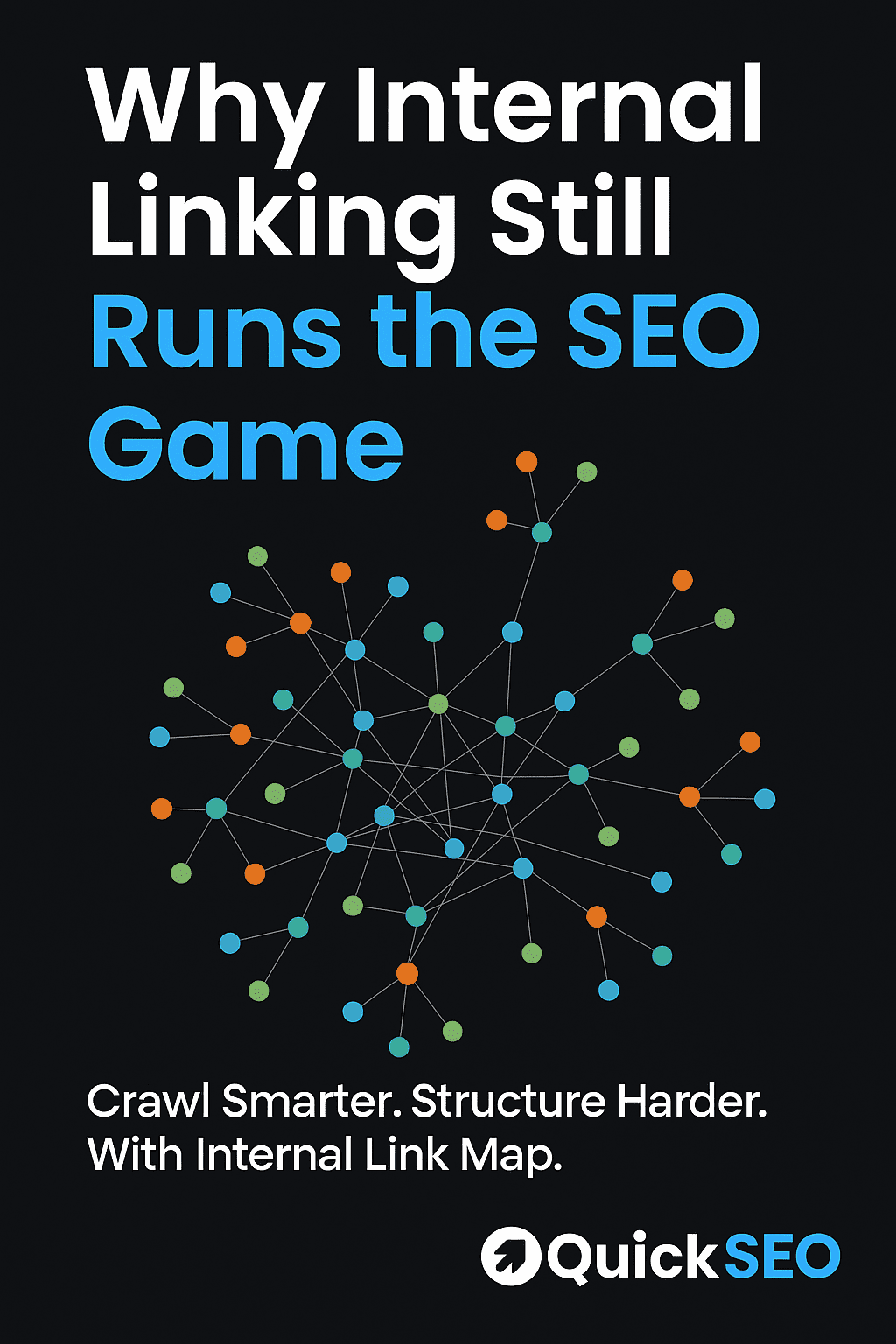
Backlinks might get you through the door, but internal links tell Google what room to sit in. In 2025, smart internal structure doesn’t just help SEO—it defines it. Quick SEO Internal Link Map gives you a full visual of your site’s architecture so you can tighten your silos, fix orphans, and flex your topical authority like a pro.
🕸️ Build Link Maps, Not Guess Maps
- ✅ Visualize how every page connects—or doesn’t
- ✅ Instantly identify orphaned content killing indexation
- ✅ Spot silos, breakpoints, and crawl traps in seconds
- ✅ Export CSV, DOT, and HTML graphs for clean reporting
Example: You think your “SEO Tools” category is linked well—Internal Link Map shows it’s stranded like an SEO ghost town.
🧠 Structure That Boosts Rankings (and Revenue)
Google doesn’t just crawl links—it interprets them. Your internal structure tells search engines what matters and how topics relate. A clean link graph increases crawl efficiency, indexation, and topical authority. AKA: better rankings and fewer bloated pages wasting budget.
Fact: Fixing internal links often improves rankings faster than building backlinks. Why? Because Google trusts your architecture more than your outreach email.
⚙️ Why Quick SEO Internal Link Map Slaps
- 🧾 Outputs a full CSV of internal link pairs
- 🧭 Finds orphan pages instantly (zero inbound links)
- 📊 Generates a Graphviz `.dot` file for pro diagrams
- 🌐 Produces a sexy HTML map you can scroll and share
Use Case: Doing a site audit for a client? Run the tool, export the graph, and drop that map in your deck. Instant credibility, zero fluff.
Takeaway: Internal linking isn’t sexy—but this tool makes it feel that way. Stop guessing. Stop opening 90 tabs to trace how your blog connects to your product pages. Quick SEO Internal Link Map gives you the whole picture, instantly.
